One API. Three ways to use it.
Use MCP, JSON CLI or the dependency-free Python client. Each adapter calls the same Unity editor engine; it does not automate the desktop or duplicate spreadsheet parsing.
Connect once
python Assets/DesignDataTable/Integrations/AI/ddt_cli.py --ai-info --pretty
python Assets/DesignDataTable/Integrations/AI/ddt_cli.py --project C:/Projects/MyGame --mcp-config --pretty
Copy the returned mcpServers object into your MCP client's documented configuration. The command only prints configuration. Restart/reconnect that client to discover tools. A portable local plugin and skill are in Integrations/AI; use Python 3.10+ and an explicit project path or DDT_PROJECT for a cached plugin.
Clients discover tools/list, tool schemas and startup instructions. An AI without this server or project instructions cannot be forced to discover them.
Available features
| Feature | API | Description |
|---|---|---|
| Discovery | ddt_help / tables.search | Feature inventory, original source paths, sheets and global source GUIDs. |
| Game records | table.read; table.insert/update/upsert/delete | Use literal Int32 Ids and named field values. Read only needed fields. |
| Schema | schema.add/update/delete | Add, rename or remove fields; validate types and synchronize Summary. |
| Enums | enum.set/delete/connect/provider | Local definitions, stable omitted member numbers, shared providers and dependent validation. |
| Ranges | range.read/write/clear | A1 matrices, original inputs and calculated display values; 10,000-cell limit. |
| Formatting | range.format/merge/unmerge; table.format | Fonts, fills, number formats, alignment, sizes, merges and structured table style. |
| Sheets | sheet.add/rename/delete/freeze | Named worksheets and zero-based frozen row/column counts. |
| Structure | rows.insert/delete; columns.insert/delete | Zero-based index and count. Game tables must remain valid. |
| Transaction | batch | Up to 100 actions and 10,000 targeted entries in one workbook. Revision + draft + type validation. Invalid actions do not commit. |
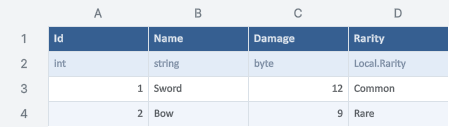
| Image | render; batch preview | Native shared cell, chart and shape painters. 2,000 cells, 4,096 pixels per side; requires graphics-enabled Unity. |
| Recovery | request status / cancel | Retained request Id, explicit cancellation and expiry. A commit already running may finish; check status before retry. |
MCP tools
| Tool | Purpose |
|---|---|
ddt_help | Discover the supported engine operations, all batch actions, limits and required workflow. No running Unity needed. |
ddt_search_tables | Find original workbook paths and sheets by table name. Global Enum providers return sourceGuid. Default 20 results; includeWorkbooks scans at most 200 other project workbooks. |
ddt_inspect | Read saved worksheet names, registered column names/types/descriptions and local/global Enum choices. Supply path or a registered game table. Never reads an open unsaved draft. |
ddt_read_table | Read game records by literal Int32 Id and exact field names. Default 20 rows; specify fields and pagination to reduce output. |
ddt_read_range | Read a bounded A1 range as input and calculated-display matrices. Protected hidden formulas are omitted. Maximum 10000 cells. |
ddt_batch | Validate up to 100 edits in ONE workbook before committing once. Read expectedRevision first; preview a dryRun, then commit. Table actions use recordId and values. Schema actions use name/type/description. enum.set retains existing omitted numbers. Any failure rejects the batch. preview returns a native image of range. |
ddt_render | Render a saved A1 range with the editor cell/shape/chart painters; returns a PNG without activating a document window. Maximum 2000 cells and 4096 pixels per side. Requires graphics-enabled Unity. |
ddt_request_status | Check a timed-out request before retrying a mutation. Does not re-enqueue and works when Unity is closed. |
A small, safe workflow
- Search the table name, then inspect schema and revision.
- Read only needed records or ranges.
- Run a dry-run batch, inspect diagnostics and its image.
- Commit the same actions with dryRun:false and unchanged expectedRevision.
- Read back. On timeout, inspect request status before retrying.
python Assets/DesignDataTable/Integrations/AI/ddt_cli.py --request Assets/DesignDataTable/Integrations/AI/examples/search.json --pretty
Id update · Range + format · Schema + Enum · Python example · Request schema · Machine inventory
Examples are templates. Replace the revision placeholder with the real inspected SHA-256; inspect actual columns and Enum choices before editing.
Preview from the actual engine
Limits that matter
Unity must be open, idle and outside Play Mode. Saved project-contained XLSX/CSV files are supported; an unsaved human editor draft blocks mutations. CSV supports cell operations, not XLSX formatting. Formula Ids cannot use Id addressing. Each atomic batch edits one workbook. Shared Enum changes also validate dependent registered tables.
Read results are paginated. Schema responses cap columns and Enum definitions; check truncated. Requests are at most 1 MiB. Native preview requires a graphics-enabled editor. Formatting and objects follow the editor's supported subset, not complete Excel compatibility.
Requests, responses and images are local under Library/DesignDataTable/Automation and may contain cell values. They are not sent to a service by this integration. MCP clients decide how returned content is used. Official Python MCP SDK 2.3.0 interoperability was exercised on Windows with protocol 2025-11-25; other clients/platforms remain unverified.
Legacy inspect/schema/read/dry-run/write/validate-game operations and the Scripts/Editor/ddt_cli.py entry point remain available. A timeout now requests cancellation of work that has not committed; inspect its retained status because an already-running commit may finish.