언어 설정·번역 테이블
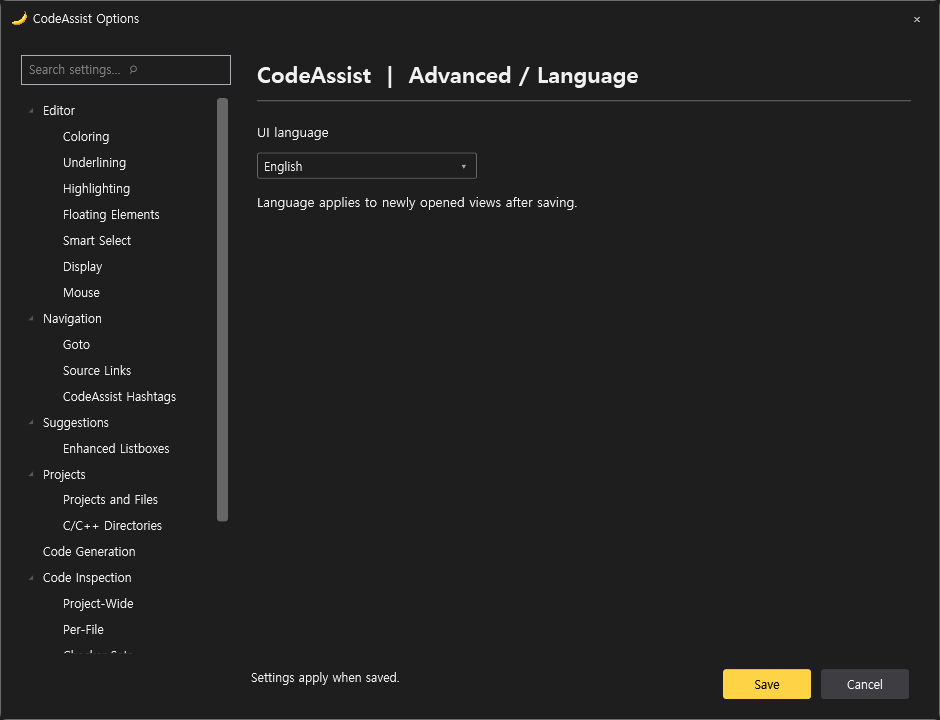
설정 → 고급 → 언어에서 시스템 언어 / 한국어 / English를 선택하고 저장합니다. 선택은 startup.xml의 UiLanguage에 보존됩니다. 저장 후 새로 여는 옵션·Welcome에 적용됩니다. Welcome의 언어 선택은 현재 Welcome 문서를 즉시 갱신합니다. 다른 화면은 다시 열면 적용됩니다.
새 언어 추가
원본 표는 CodeAssist.Core/Localization/ui.xml이며 Core 어셈블리에 포함됩니다. 각 entry의 key와 source는 유지하고 <text lang="ja">번역</text>처럼 언어 열을 추가합니다. 테이블에 추가된 언어는 선택 목록에 자동으로 나타납니다. 변경 후 빌드·설치가 필요합니다. 지역 코드(ko-KR)는 정확한 번역 → ko → en 순으로 조회하며, 없는 문구는 원문으로 표시합니다. XML 특수문자는 이스케이프해야 합니다. DTD/외부 엔터티는 허용하지 않습니다.
현재 범위는 옵션 페이지와 Welcome의 등록된 문구입니다. VS 자체 메뉴와 기존 명령·진단·InfoBar 모든 문자열의 번역까지 완료한 것은 아닙니다.
이번 구현 및 검증
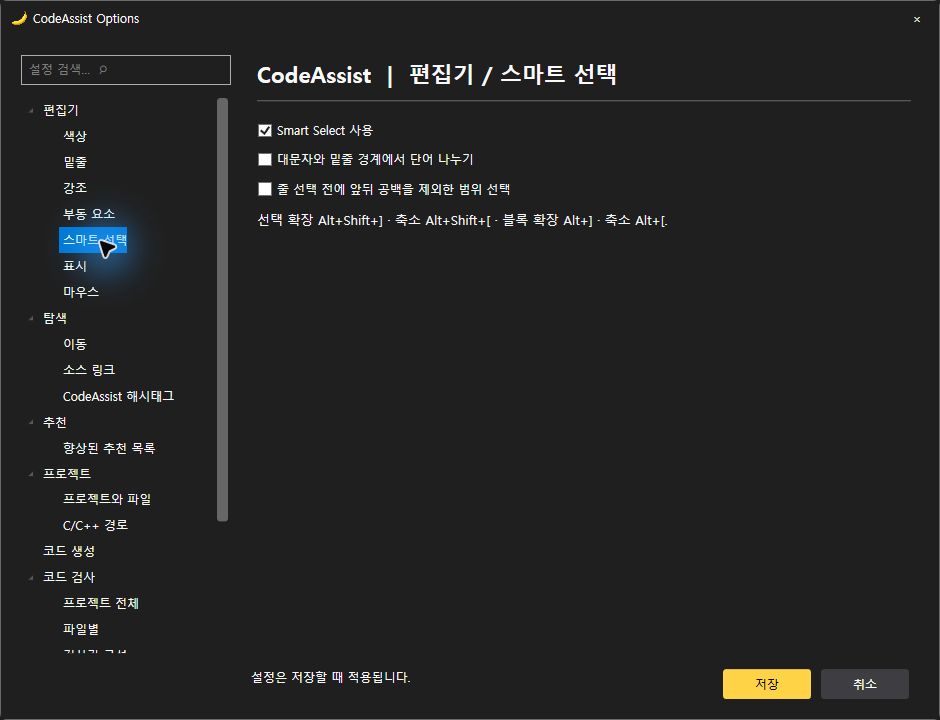
- Smart Select 사용 여부, 대문자·밑줄 단어 분리, 줄 전체 선택 전 공백 제외 범위 선택을 실제 명령에 연결했습니다. 기본값은 기존 CodeAssist 동작을 보존하며 VA 공장 기본값과 동일하다고 검증하지 않았습니다.
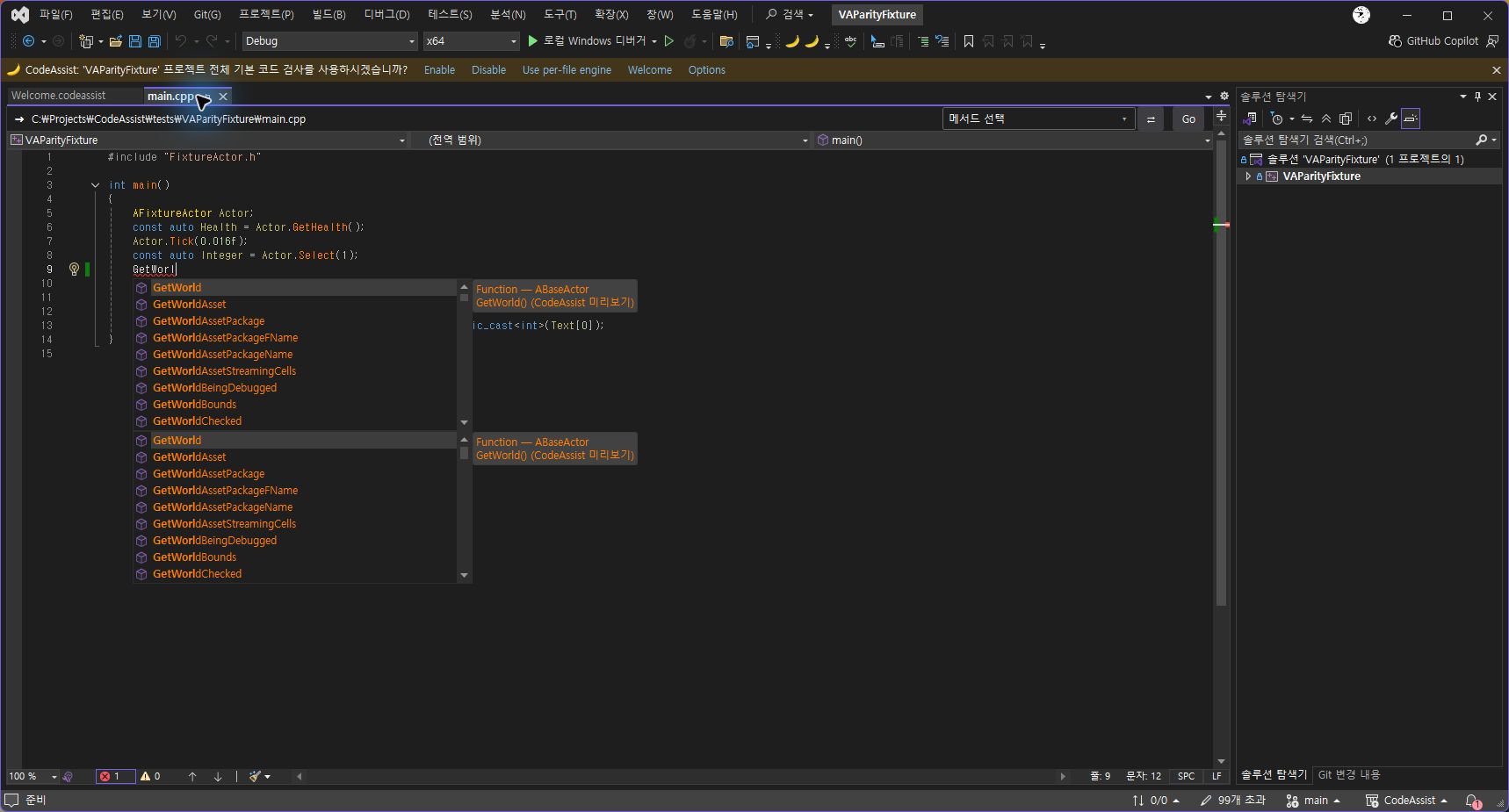
- 실제0.0.64 IDE에서 함수 추천 목록·도움말의 주황색 표시와 Welcome 문서 탭 시작 표시를 재확인했습니다. 한국어 Smart Select 토글 화면은0.0.63 IDE에서 확인했습니다.0.0.64는 언어 목록을 테이블에서 자동 생성하도록 보강했습니다.
- 회귀115개 통과. 한국어/영어/지역 코드/영어 fallback·설정 복사·단어 경계·선택 축소 복원 검사를 포함합니다.
- 옵션의 다른 미지원 범주와 전체 토글의 VA 동등성은 미완료입니다.
번역표
| 안정 키 | 한국어 | 영어 |
|---|---|---|
| ui.5fb926229090 | 저장 | Save |
| ui.be876433993a | 취소 | Cancel |
| ui.1e8c10206f5b | 닫기 | Close |
| ui.dc13dbfbfaf2 | 설정 검색 | Search settings |
| ui.b2b93c0fe82d | 설정 검색… ⌕ | Search settings… ⌕ |
| ui.7f6e8753f903 | 설정은 저장할 때 적용됩니다. | Settings apply when saved. |
| ui.3e06fafb2485 | 색상은 #RRGGBB 형식으로 입력하세요. | Enter a color in #RRGGBB format. |
| ui.0a742e39bd6b | 자동 완성 사용 | Enable code completion |
| ui.1d908a61a7ba | 심볼 색상 표시 | Color symbols |
| ui.77933ce40141 | 클립보드 기록 항목 수 | Clipboard history items |
| ui.e3f68552b5dc | 자동 괄호·붙여넣기 서식·대소문자 자동 교정은 현재 VS의 편집기 설정을 따릅니다. | Automatic brackets, paste formatting and case repair currently use Visual Studio settings. |
| ui.d642458e7e5f | 향상된 심볼 색상 사용 | Enable enhanced symbol coloring |
| ui.ec05f530725f | 클래스와 타입 | Classes and types |
| ui.541034c474b7 | 변수 | Variables |
| ui.16a8523fe90a | 함수 | Functions |
| ui.35a733f3603c | Unreal 매크로 | Unreal macros |
| ui.0594b124faea | 추천 팔레트 복원 | Restore recommended palette |
| ui.66d03af33c6b | 추천 팔레트를 복원하거나 원하는 #RRGGBB 색상을 입력할 수 있습니다. | Restore the recommended palette or enter a #RRGGBB color. |
| ui.f2f8eccd001f | 파일 내 기본 코드 진단 사용 | Enable basic file diagnostics |
| ui.01b0ab0cd521 | 확정 구문·스코프 오류 후보를 표시합니다. 컴파일러 전체 진단과 동일하지 않습니다. | Show syntax and scope issue candidates. This is not a full compiler diagnostic engine. |
| ui.b02e85c63043 | Find Selected: Alt+K · 다음/이전 선택 항목 이동은 기존 명령을 사용합니다. | Find Selected: Alt+K. Use the existing commands for next/previous matches. |
| ui.61935cdc25a7 | 단축키 도움말 | Keyboard shortcut help |
| ui.66e09c36971c | 빠른 작업은 Alt+Shift+Q로 엽니다. 부동 빠른 작업 툴바는 현재 지원하지 않습니다. | Open Quick Actions with Alt+Shift+Q. A floating action toolbar is not yet supported. |
| ui.e2622fbee4fd | Smart Select 사용 | Enable Smart Select |
| ui.ff9944bb0741 | 대문자와 밑줄 경계에서 단어 나누기 | Split words at case changes and underscores |
| ui.7ff7418ae8b3 | 줄 선택 전에 앞뒤 공백을 제외한 범위 선택 | Select trimmed line contents before the entire line |
| ui.d00d2b7f0d08 | 선택 확장 Alt+Shift+] · 축소 Alt+Shift+[ · 블록 확장 Alt+] · 축소 Alt+[. | Extend Alt+Shift+] · Shrink Alt+Shift+[ · Extend block Alt+] · Shrink block Alt+[. |
| ui.e14faa46b4e1 | 편집기 상단 Context Bar 표시 | Show Context Bar above the editor |
| ui.66da30755409 | 파일 경로·메서드 이동·관련 파일 명령을 편집기 위에 표시합니다. | Show file paths, method navigation and related file commands above the editor. |
| ui.97c9d50080f5 | 기본 마우스 동작은 Visual Studio 설정을 사용합니다. | Mouse behavior uses Visual Studio settings. |
| ui.1dac55f3f882 | Alt+G 정의/구현 · Alt+O 대응 파일 · Alt+Shift+S 심볼 · Alt+Shift+O 파일. | Alt+G definition/implementation · Alt+O corresponding file · Alt+Shift+S symbols · Alt+Shift+O files. |
| ui.ad4fc2bbc816 | 명령과 단축키는 설치된 CodeAssist 명령 테이블을 사용합니다. 기존 키보드 설정을 덮어쓰지 않습니다. | Commands use the installed CodeAssist command table. Existing keyboard settings are preserved. |
| ui.9913118adfe6 | 외부 소스 링크 규칙 편집기는 미구현입니다. | An external source link rule editor is not yet implemented. |
| ui.13cb441d7cec | 주석의 #태그를 Alt+Shift+H로 검색합니다. | Search comment #tags with Alt+Shift+H. |
| ui.bebb6c42196b | CodeAssist 자동 완성 | CodeAssist completion |
| ui.d0d3eac9f65b | C/C++ 완성 후보와 clangd 기반 후보를 결합합니다. 표시 결과는 프로젝트 구성과 인덱스 상태에 영향을 받습니다. | Combine C/C++ and clangd candidates. Results depend on project configuration and index readiness. |
| ui.d6d749c48e39 | 범용 C/C++ 프로젝트를 지원하며 Unreal은 추가 지원 대상입니다. | Support general C/C++ projects with additional Unreal support. |
| ui.244a7891c915 | 현재 프로젝트의 파일과 심볼을 인덱싱합니다. 엔진·시스템 헤더 캐시는 프로젝트 심볼과 분리합니다. | Index project files and symbols. Engine/system header caches are separate. |
| ui.022c6ed7510d | 포함 경로는 프로젝트 컴파일 구성에서 읽습니다. 사용자 경로 편집은 아직 제공하지 않습니다. | Read include paths from project compilation settings. Editing custom paths is not yet supported. |
| ui.8238bc5fd540 | 선언 만들기 Alt+Shift+C · 스니펫 삽입은 CodeAssist 메뉴에서 실행합니다. | Create from Usage: Alt+Shift+C. Insert snippets from the CodeAssist menu. |
| ui.c479af03cc48 | 프로젝트 전체 기본 검사 | Project-wide basic inspection |
| ui.a4b1a4ed4cd7 | 파일별 검사 | Per-file inspection |
| ui.b89fbbee189f | 검사 사용 안 함 | Disable inspections |
| ui.b7e3effedd7b | 상단 안내에서 선택 | Ask in the notification bar |
| ui.7933e9a76776 | 파일별 검사 활성화 | Enable per-file inspection |
| ui.8835e23178fe | 프로젝트 전체 검사는 로컬 프로젝트 C/C++ 파일의 확정 구문 오류 후보를 검사해 오류 목록에 표시합니다. 컴파일러의 전체 진단을 대체하지 않습니다. | Check local project C/C++ syntax issue candidates and show results in Error List. This does not replace full compiler diagnostics. |
| ui.9b0835261899 | 프로젝트 전체: 괄호·제어문 구문 검사. 파일별: 타입 대소문자·식별자·구문·스코프 후보 검사. 추가 검사기는 미구현입니다. | Project: delimiter/control-flow checks. Per file: type case, identifier, syntax and scope candidates. Additional checkers are not implemented. |
| ui.34d52682f8d0 | 로컬 AI·에이전트 연결은 현재 구현하지 않았습니다. | Local AI and agent integration is not yet implemented. |
| ui.0d90ef527728 | 전용 디버그 보조 기능은 현재 지원하지 않습니다. | Dedicated debugging assistance is not yet supported. |
| ui.f06777473271 | Unreal 반사 매크로와 메타 지정자·엔진 심볼을 지원합니다. GPU 전용 분석기는 미구현입니다. | Support Unreal reflection macros, metadata and engine symbols. A GPU analyzer is not implemented. |
| ui.ac160f848818 | 시작할 때 Welcome 문서 열기 | Open Welcome at startup |
| ui.317b69fc0dfd | 상단 안내바 표시 | Show notification bar |
| ui.c38ae6888911 | CodeAssist 문서 | CodeAssist documentation |
| ui.10458a1021da | 편집 후 문서 인덱스 갱신 대기 (ms) | Document index update delay after editing (ms) |
| ui.835b8ad3b6cd | 빠른 입력 중 중복 분석을 합칩니다. 초기 인덱싱 시간은 프로젝트 구성에 따라 다릅니다. | Coalesce analysis during rapid input. Initial indexing depends on project configuration. |
| ui.5f9f2e875929 | CodeAssist에 오신 것을 환영합니다. 권장 설정을 확인하고 저장하세요. | Welcome to CodeAssist. Review and save the recommended settings. |
| ui.529efaf7d647 | 이 범주는 현재 지원하지 않습니다. 제공되는 기능은 관련 설정에서 사용할 수 있습니다. | This category is not yet supported. Available features are accessible in the related settings. |
| ui.7aabb6fb160c | 코드를 이해하고, 원하는 위치로 이동하고, 더 빠르게 편집하세요. | Understand code, navigate to what matters, and edit faster. |
| ui.bc4bb57b266c | 주요 기능 | Top features |
| ui.086f41200b47 | 단축키 | Keyboard shortcuts |
| ui.689e9f028ed8 | 프로젝트의 C/C++ 기본 구문 검사 결과를 오류 목록에서 확인하세요. | Review basic project C/C++ syntax inspection results in Error List. |
| ui.de15e9aa7097 | 심볼 팔레트와 자동 완성·클립보드 설정을 한곳에서 조정하세요. | Adjust symbol colors, completion and clipboard settings in one place. |
| ui.dde85d659a93 | 파일·심볼·메서드·대응 파일을 단축키와 Context Bar로 찾으세요. | Find files, symbols, methods and corresponding files using shortcuts and Context Bar. |
| ui.13a23ecbbbb4 | 범용 C/C++ 작업 흐름에 Unreal 매크로와 엔진 탐색 지원을 더합니다. | Add Unreal macros and engine navigation to general C/C++ workflows. |
| ui.00a5dc5fc36f | 설치·권장 색상·탐색·검사 기능의 사용 방법과 검증 범위를 확인하세요. | Read about installation, colors, navigation, inspections and verification scope. |
| ui.960d26982d32 | 오프라인 사용 안내 | Offline user guide |
| ui.761de67b68ec | 심볼 찾기 Alt+Shift+S | Find Symbol Alt+Shift+S |
| ui.4af75fce0a2c | 파일 열기 Alt+Shift+O | Open File Alt+Shift+O |
| ui.9f1fdac99643 | 개선할 점이나 재현 방법을 적어 복사하세요. 내용은 자동 전송하지 않습니다. | Write feedback or reproduction steps and copy them. Nothing is sent automatically. |
| ui.41908a006476 | 피드백 내용 | Feedback |
| ui.f5640cf6543f | 피드백 내용 복사 | Copy feedback |
| ui.d9381128c086 | 복사했습니다. | Copied. |
| ui.71af66d7c97f | 클립보드에 복사하지 못했습니다. 잠시 뒤 다시 시도하세요. | Could not copy to the clipboard. Please try again. |
| ui.29b8dbb00979 | Visual Studio 시작 시 Welcome 열기 | Open Welcome when Visual Studio starts |
| ui.665cf081f45f | CodeAssist · 범용 C/C++ 개발 보조 · Unreal Engine 지원 | CodeAssist · General C/C++ assistance · Unreal Engine support |
| ui.d870406c5d15 | 언어 | Language |
| ui.42bf8c453699 | UI 언어 | UI language |
| ui.a575009cf3d5 | 언어는 저장 후 새로 여는 화면에 적용됩니다. | Language applies to newly opened views after saving. |
| ui.bee6f0eca84c | 시스템 언어 | System language |
| ui.936a161c3931 | 편집기 | Editor |
| ui.931d37b7a209 | 색상 | Coloring |
| ui.ad1668a5241d | 밑줄 | Underlining |
| ui.7a4a9fe7f2da | 강조 | Highlighting |
| ui.2f5995fe5981 | 부동 요소 | Floating Elements |
| ui.f1326d00cced | 스마트 선택 | Smart Select |
| ui.34e108c0896d | 표시 | Display |
| ui.55c1520824a8 | 마우스 | Mouse |
| ui.3db65f8c2a7d | 탐색 | Navigation |
| ui.f1079111a1c1 | 이동 | Goto |
| ui.1daa9b7c7fe5 | 소스 링크 | Source Links |
| ui.20e2990eaf99 | CodeAssist 해시태그 | CodeAssist Hashtags |
| ui.16c1d601fc66 | 추천 | Suggestions |
| ui.6717832dcbee | 향상된 추천 목록 | Enhanced Listboxes |
| ui.04e2a9728af7 | 프로젝트 | Projects |
| ui.c98f7d5e8895 | 프로젝트와 파일 | Projects and Files |
| ui.630e99629241 | C/C++ 경로 | C/C++ Directories |
| ui.6dd237e349c9 | 코드 생성 | Code Generation |
| ui.faeb12c9dfa0 | 코드 검사 | Code Inspection |
| ui.3dc198a486b5 | 프로젝트 전체 | Project-Wide |
| ui.f24944c1eea3 | 파일별 | Per-File |
| ui.73405b2fcb2a | 검사기 구성 | Checker Sets |
| ui.86db970426ef | CodeAssist 인텔리전스 | CodeAssist Intelligence |
| ui.8c3fc9e4b991 | 디버그 보조 | Debug Assistance |
| ui.a82acc52a7f9 | 게임과 GPU | Games & GPUs |
| ui.9f088dbebd6c | 고급 | Advanced |
| ui.442aded87a55 | 성능 | Performance |
| ui.a4fe65264ef7 | 언어 | Language |
| ui.d0db8b5e364b | 설정 | Options |
| ui.c205924de0fe | 문서 | Documentation |
| ui.700fe314615c | CodeAssist 설정 | CodeAssist Options |
| ui.completion.native.colors | Visual Studio 기본 추천 색상 사용 | Use Visual Studio default completion colors |
| ui.a56868aef2b0 | 붙여넣기 후 서식 지정 | Format after paste |
| ui.a6be008f0700 | 여러 줄 주석 이어쓰기 | Extend multi-line comments |
| ui.831adbacdb7c | 괄호 및 따옴표 자동 닫기 | Insert () and closing brackets and quotes |
| ui.eebaedfe2e25 | 메서드 이름과 () 사이 공백 수 | Spaces between method name and () |
| ui.e6d6496e29d7 | 닫는 중괄호 삽입 위치: | Insert closing brace: |
| ui.2643d0f6e0cc | 빈 줄 다음에 | after a blank line |
| ui.b1370abbc8fb | 다음 줄에 | on the next line |
| ui.3b8bcde1684a | 같은 줄에 | on the same line |
| ui.4b204809ab8b | 문자 입력으로 선택 영역 감싸기 | Surround Selection via character toggles |
| ui.2b0ca3e64f3d | 줄 주석으로 전환할 때 공백 삽입 | Insert a space when toggling a line into a comment |
| ui.46758ba762cb | 아직 구현되지 않은 편집기 옵션은 검증 문서에 기록되어 있습니다. | Editor options not yet implemented remain listed in the verification document. |
| ui.cabd5db317ee | 선택 영역을 작은 단위로 시작하고 확장 | Start and grow selections by relatively small increments |
| ui.6953fca6d81e | 블록 외 선택은 현재 단어부터 시작 | Start non-block selections with the current word |
| ui.c88fdf0422ce | 대소문자 변화로 현재 단어 구분 | Changes in case delimit current word |
| ui.7c735049e710 | 밑줄로 현재 단어 구분 | Underscores delimit current word |
| ui.11b7f118602a | 심볼 빠른 정보 표시 | Show symbol Quick Info |
| ui.95b56e296256 | {0}에 오신 것을 환영합니다 | Welcome to {0} |
| ui.f838a6ae341f | CodeAssist의 주요 기능 | What's New with CodeAssist |
| ui.333f43c3a7f6 | CodeAssist 사용 안내 | Learn More about CodeAssist |
| ui.cdc8258f4139 | 의견 보내기 | Share your Feedback |
| ui.d1ce81b5defa | CodeAssist 단축키 | CodeAssist Shortcuts |
| ui.6344a8cda29c | 자세히 보기 › | Learn More › |
| ui.deaf36c2ab1f | 프로젝트 코드 검사 | PROJECT CODE INSPECTION |
| ui.9d92b907a576 | 편집기와 색상 | EDITOR & COLORING |
| ui.9f1583fb5cf0 | 빠른 심볼 탐색 | FAST SYMBOL NAVIGATION |
| ui.2a29c155ad46 | Unreal 및 C/C++ | UNREAL & C/C++ |
| ui.a87f916d683c | 모든 참조 찾기 | Find References |
| ui.aaf5ca5d1020 | 선택 항목 찾기 | Find Selected |
| ui.1ae07f0c49e8 | 심볼 찾기 | Find Symbol |
| ui.43cdaa928810 | 정의 / 구현으로 이동 | Go to Definition / Implementation |
| ui.f706e26e03a5 | 관련 항목으로 이동 | Go to Related |
| ui.7c2cc19ecf81 | 메서드 목록 | List Methods |
| ui.270b2597810e | 대응 파일 | Corresponding File |
| ui.1e8d18f62f2d | 파일 열기 | Open File |
| ui.8b796de5fa8f | 클립보드 기록 | Multiple Clipboards |
| ui.2cc2b6f7f200 | 빠른 작업 | Quick Actions |
| ui.3064d79a295c | 이름 바꾸기 | Rename |
| ui.eb485662972f | 해시태그 | Hashtags |
| ui.3806efdd2870 | 도움말 검색 | Search help |
| ui.b969b3f35d14 | 일치하는 도움말이 없습니다. | No matching topics |
| ui.2b4e345dd511 | 복사했습니다. 원하는 이슈나 대화에 붙여넣으세요. | Copied. Paste it into your issue or message. |
| ui.85045ccc0567 | 변경 적용 | Apply changes |
| ui.5d9f33f62e13 | 새 파일 이름 | New file name |
| ui.e899adf5b91f | 스니펫 제목 | Snippet title |
| ui.603c2c4b14f2 | 스니펫 축약어 | Snippet shortcut |
| ui.6990d3217b77 | 파일 생성 | Create file |
| ui.b4baa1847b67 | 헤더 이름 (시스템 헤더는 <...> 형식) | Header name (use <...> for system headers) |
| ui.4d73aa616ceb | 타입 이름 (class 또는 struct) | Qualified type name (class or struct) |
| ui.b691cb2fecc3 | 먼저 프로젝트 파일을 선택하세요. | Select a project file first. |
| ui.40537c0fd7bc | 파일 이름을 바꾸기 전에 저장하세요. | Save the document before renaming it. |
| ui.eb8557710479 | http 또는 https 링크 안에 커서를 놓으세요. | Place the caret inside an http or https link. |
| ui.711911a20eab | 메서드 선언 또는 시그니처 줄을 선택하세요. | Select a method declaration or its signature line. |
| ui.9de309162c5f | 소스 링크 규칙 | Source link rules |
| ui.df174a3f2faa | 사용 | Enabled |
| ui.cdfc76a8a310 | 정규식 | Regular expression |
| ui.709a23220f2c | 이름 | Name |
| ui.1fff6a31661b | 패턴 | Pattern |
| ui.b7d8a4de2bb4 | 대상 URL | Target URL |
| ui.362f56c8c8a6 | 추가 / 수정 | Add / Update |
| ui.f6fdbe48dc54 | 삭제 | Delete |
| ui.f0c6d84fef53 | GitHub 예제 | GitHub example |
| ui.41cedf44cce7 | FogBugz 예제 | FogBugz example |
| ui.c8da1aec1918 | 커서 위치에 일치하는 소스 링크가 없습니다. 탐색 / 소스 링크에서 규칙을 설정하세요. | No source link matches the caret. Configure Navigation / Source Links. |
| ui.d3d692b75295 | 파서 스레드 수 | Parser threads |
| ui.83fbf47616cd | 현재 줄 강조 | Highlight current line |
| ui.6c70407e51a5 | 짝이 맞는 괄호 강조 | Highlight matching braces |
| ui.d5fe9f9d4f71 | 짝이 맞지 않는 괄호 강조 | Highlight mismatching braces |
| ui.6a6f65a7a63b | 컬럼 기준선 표시 | Show column indicator |
| ui.65ba00e95e60 | 컬럼 | Column |
| ui.dacf9a998adb | Tab으로 스니펫 단축어 확장 | Expand snippet shortcuts with Tab |
| ui.929a28d26142 | 편집기 안내선 | Guides |
| ui.c1ab6c9b9947 | 머리글자 약어 완성 | Acronym completion |
| ui.260c7eefec33 | 축약어 완성 | Shorthand completion |
| ui.d55d8bc694be | 포인터 점 입력을 화살표로 변환 | Convert pointer dot to arrow |
| ui.ea72a2efaba7 | 타입 이름 대소문자 교정 | Repair type name case |
| ui.2f212a9db758 | m 다음 Shift 입력으로 밑줄 추가 | Insert underscore after m and Shift |
| ui.2f20a3a85415 | 지역 심볼 굵게 표시 | Local symbols in bold |
| ui.01edbff07fc7 | 시스템 심볼 기울임 표시 | System symbols in italics |
| ui.709372269d87 | 커서 심볼 참조 강조 | Highlight references under caret |
| ui.090b00969817 | Alt + 클릭: 정의로 이동 | Alt + click: Go to definition |
| ui.71ebe244f1d9 | 출력 창 파일 이름 강조 | Highlight output filenames |
| ui.ca58964377c1 | 검색 결과 강조 | Highlight find results |
| ui.89a97ba0cdd5 | 주석·문자열 맞춤법 밑줄 | Underline comment and string spelling |
| ui.cfad97405a76 | 스텝 필터 사용 | Step filter enabled |
| ui.49cd9ccbc3da | 추천 목록 사용 | Suggestion lists |
| ui.e7cb457f2e1e | 예상 타입 리터럴 추천 | Expected-type literal suggestions |
| ui.12dc3fe9f937 | 스니펫 추천 | Snippet suggestions |
| ui.2ae9d5f291d4 | 추가 C/C++ 파일 확장자 | Additional C/C++ file extensions |
| ui.65c84dfe8cf3 | 컴파일 데이터베이스 폴더 | Compilation database directory |
| ui.d346424d2b38 | 파일 확장자 | File Extensions |
| ui.04996d9e3e7c | 컴파일 데이터베이스 | Compilation Database |
| ui.dcd0aa3ea0bf | 생성 템플릿 | Generation Templates |
| ui.7fdfbeec1c20 | 메서드 구현 본문 템플릿 | Method implementation body template |
| ui.4eef27df518f | 선택한 수정 미리보기 | Preview selected fix |
| ui.602fc62a31eb | 지원하지 않는 구문입니다. 완전한 선언이나 표현식을 선택하세요. | The selected syntax is unsupported. Select the complete declaration or expression. |
| ui.ba5e8c04aa2a | 새 매개변수 순서 (1부터 시작, 예: 2,1; 순서 변경만 지원) | New parameter order (one-based, e.g. 2,1; reorder only) |
| ui.880a8ec6fc89 | 새 전역 함수 서명 (출력은 참조 매개변수로 지정) | New free-function signature (use reference parameters for outputs) |
| ui.eaa81b86f0f6 | 접근자 이름 접미사 | Accessor name suffix |
| ui.fe8b32e06a54 | 멤버 선언 | Member declaration |
| ui.1febbd946f48 | 새 멤버 이름 | New member name |
| ui.0449e1003dd0 | 네임스페이스 | Namespace |
| ui.e4647330ae63 | 한정된 소유 타입 (전역 함수는 비워 두세요) | Qualified owner type (empty for free function) |
| ui.ef413eac416e | 파생 클래스에서 구현할 가상 함수 선언 | Virtual declarations to implement in the derived class |
| ui.8bd702d198ef | 한정된 scoped enum 이름 | Qualified scoped enum name |
| ui.2cc1946e9d75 | enum 선언 | Enum declaration |